Text Component Line Number
Posted by Rob Camick on May 23, 2009
Over the years I’ve seen many requests in the forums for the ability to display line numbers in a text component. I’ve probably seen just as many solutions as well. I even posted my own solution years ago. It was my first attempt at doing custom painting so I figured now was a good time to revisit that code to see if I could improve on it.
The approach I took was to create a separate component that could be added to a scroll pane along with the related text component. The main reason for this was to allow for horizontal scrolling of the text component, while having the line numbers remain fixed at the left of the scroll pane. It will support a JTextArea or JTextPane. Typically, a single font will be used by the component so the line heights are all the same size. However, in the case of a JTextPane, it will also support the usage of multiple fonts and font sizes.
The result is the TextLineNumber component. The main features of the TextLineNumber are the added support for:
- wrapped lines – the first line will show the line number and the wrapped lines will show nothing
- current line number highllighting – the line number for the current line (the line with the caret) will be painted a different color
Sample code for using the TextLineNumber would be as follows:
JTextPane textPane = new JTextPane();

JScrollPane scrollPane = new JScrollPane(textPane);

TextLineNumber tln = new TextLineNumber(textPane);

scrollPane.setRowHeaderView( tln );
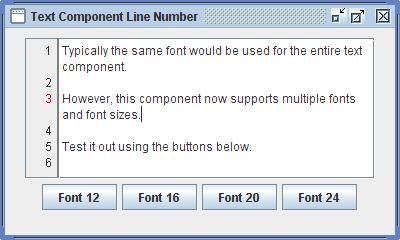
TextLineNumber extends JComponent so you can easily customize the foreground, background or border. The font defaults to the related text components font. It can be changed, but you are responsible for ensuring the font size is reasonable. It also supports a couple of methods to allow for further customization:
- setBorderGap – a convenience method to adjust the left and right insets of the Border, while retaining the outer MatteBorder
- setCurrentLineForeground – the Color of the current line number
- setDigitAlignment – align the line numbers to the LEFT, CENTER or RIGHT
- setMinimumDisplayDigits – controls the minimum width of the component. The width will increase automatically as necessary.
- setUpdateFont – enables the automatic updating of the Font when the Font of the related text component changes.
 Java Tips Weblog
jago said
Nice :)
I would like to do something similar with a JTable – show its row numbers, but do not use the first column for it but a separate space left of it.
Do you have any idea if somebody had done this before or how to do it?
Thanks!
Rob Camick said
Search the blog for all entries related to “JTable” and you should find the “Row Number Table”.
scphan said
Is it possible to implement the code folding behavior with your current implementation of the line numbering system?
Rob Camick said
This component can’t do the folding for you, that is complex logic that must be handled by the text component view.
The getTextLineNumber() method simply returns a string to be painted for the current line. So if you know what lines are “folded”, then you can return a “folded string” to be painted. There is no standard way to implement folding, that I know of, so yes the code would need to be customized. I’ll make that method protected, so you can extend the class to implement folded lines.
scphan said
Thanks a lot for posting this solution ;), it made my project a little easier.
Paul said
Cool component many thanks for this! I used it in our GUI. I got a fix to submit if the font of the associated text component changes the TextLineNumber component needs to update for this in the constructor add this:
component.addPropertyChangeListener("font",
    new PropertyChangeListener() {
    @Override
    public void propertyChange(PropertyChangeEvent evt) {
        if (evt.getNewValue() instanceof Font) {
            Font newFont = (Font) evt.getNewValue();
            setFont(newFont);
            setPreferredWidth(true);
        }
    }
});

modify setPreferredWith the following way:

/**
 *  Calculate the width needed to display the maximum line number
 */
private void setPreferredWidth() {
    setPreferredWidth(false);
}

/**
 *  Calculate the width needed to display the maximum line number
 */
private void setPreferredWidth(boolean alwaysUpdate)
{
    Element root = component.getDocument().getDefaultRootElement();
    int lines = root.getElementCount();
    int digits = Math.max(String.valueOf(lines).length(),
        minimumDisplayDigits);

    //  Update sizes when number of digits in the line number changes

    if (alwaysUpdate || lastDigits != digits)
    {
        lastDigits = digits;
        FontMetrics fontMetrics = getFontMetrics( getFont() );
        int width = fontMetrics.charWidth( '0' ) * digits;
        Insets insets = getInsets();
        int preferredWidth = insets.left + insets.right + width;

        Dimension d = getPreferredSize();
        d.setSize(preferredWidth, HEIGHT);
        setPreferredSize( d );
        setSize( d );
    }
}
BR, Paul
Rob Camick said
Thanks, I thought about that when originally writting the code. But I ultimately decided to allow you to change the Font manually. That is, you may prefer to use a font size that is smaller than the related text component. Or you may decide to use a different font family. Therefore, using a property change listener would override the manual setting of the Font.
I suppose I can add some properties that would control whether the Font should automatically be updated or not. Until I get around to doing this the following is a little simpler solution for those that want automatic updating of the Font:
component.addPropertyChangeListener("font", new PropertyChangeListener() { @Override public void propertyChange(PropertyChangeEvent evt) { if (evt.getNewValue() instanceof Font) { Font newFont = (Font) evt.getNewValue(); setFont(newFont); lastDigits = 0; setPreferredWidth(); } } });Paul said
ah yes
also works.
Rob Camick said
Suggestion has been implemented, although it is not the default behaviour. You can turn it on using the setUpdateFont() method.
sgm said
perfect!
Just what I need!
Rob Camick said
Glad it helped.
Gnubeutel said
Great Component. You saved me a lot of work ;)
But i ended up rewriting one part in particular:
I’m using a JTextPane and might have different fonts, sizes and whatnot in one document. So i occasionally got the same line number twice in a row, because the line heights changed.
I fixed that by using the line number as the paint loop variable (looking up the line elements Y-position).
Rob Camick said
Yes, I thought about that originally but didn’t think it would be a common requirement. Anyway, I revisted the code and added support for multiple fonts and font sizes.
Bernard said
Nice code !
However, I was wondering if there should not be some synchronisation on the text Document in paintComponent(). What if the document is changed under our feet ?
Best regards,
Bernard
Rob Camick said
All updates to the Document should be done on the EDT, and since painting is done on the EDT everthing is single threaded so there should be no problem. Read the section from the Swing tutorial on “Concurrency” for more information.
Bernard said
Thanks you very much for your fast and accurate reply, the section on The Event Dispatch Thread was exactly the information I needed !
Best regards,
B.
Bernard said
All updates to the Document should be done on the EDT
Well, in fact the doc says
Some Swing component methods are labelled “thread safe” in the API specification; these can be safely invoked from any thread
and as a matter of fact, it happens that editing methods of AbstractDocument are labeled as such : remove(), insert()…
This method is thread safe, although most Swing methods are not. Please see Threads and Swing for more information.
So I’m unsure again about the thread safety :|
Couldn’t different threads be editing the Document under our feet as I first believed, relying of doc official statement above ?
Best Regards,
B.
Rob Camick said
If you invoke one of the above methods to update the Document from a separate Thread, then the code in the method will add the update onto the EDT by using SwingUtilities.invokeLater(), so ultimately the code will execute on the EDT. So yes multiple Threads can “initiate” the update of the Document, but the actual update will be done on the EDT.
If you are having a problem with the class then post a SSCCE on the Contact Us page and email me the code and I can look into it.
Mark said
That worked great!!! I love it!
Rob Camick said
It looks like you are working on a simple text editor. Glad the postings have helped.
maddcast said
Thanks a lot!
I’ve added this component to my application http://antilogics.com/epictetus.html
Rob Camick said
Glad you found a use for it!
Daniel said
Thanks, I found this very helpful!
I have a questions about the height of the component:
Why is
Integer.MAX_VALUE - 1000000used?What happens if the height of the text component exceeds that height?
Rob Camick said
Actually I’m not sure. For some reason I had painting problems. In older versions of the JDK I was getting some kind of exception (I don’t remember what). In newer versions you can use a smaller number as 1000 seems to work.
Glenn N. said
I am trying to do a code editor. My layout of the JEditorPane & Number Lines is much like what you have in your example. At the moment I have the JEditorPane in a JScrollPane and an adjustment listener on the vertical scrollbar. Whenever You scroll, the following code is used to keep the TextLineNumber in sync with the text (line is the TextLineNumber): line.setBounds(0, 0 – event.getValue(), 50, 280 + event.getValue());
My question is how close is this to what you have in your demo? Is there a better way you could recommend?
Glenn N. said
I’m sorry, I must have glazed over the comment where it said it was to be used as the row header. Problem solved.
Rob Camick said
The row header is the easiest solution. However, in general, what I like to do in cases like this is “share models”. For example you could add the TextLineNumber component to a separate scrollpane. Then you would set the vertical scrollbar property to “VERTICAL_SCROLLBAR_NEVER”. Then set the model of the vertical scrollbar to the model of the scrollbar from the main scrollpane. Check out the source code in my “Fixed Column Table”. In this case the fixed table uses the TableModel and the ListSelectionModel of the main table.
Bob said
This works as long as the content is plain text. I’m wanting to apply a stylesheet to the JTextPane and have is display Html.
Is is possible to have the line number show when the JTextPane is rendering Html as in
JTextPane textPane = new JTextPane();
textPane.setContentType(“text/html”);
or
JTextPane textPane = new JTextPane();
HtmlEditorKit editorKit = new HtmlEditorKit();
textPane.setEditorKit(editorKit);
Thanks
Rob Camick said
The Element structure of an HTML Document is different from a normal text Document. It doesn’t appear to have the concept of lines. I don’t know how to make it work.
Bob said
Thanks, The only thing I could see would be to call getDocument().getText(int, int) and then parse the text for “\n” though that doesn’t seem too efficient.
usac-sistemas said
Nice component, it works perfectly, just what i was looking for, thanks! :D
Rob Camick said
Glad it does what you want.
Johan Maasing said
I was implementing a similar component but got strange artifacts, looked like the scrollpane was blitting the wrong areas when I updated the caret position. This only happened when the component was obscured by another component, like a drop down combo box. Yours worked perfectly of course :-) So using your code as a reference I could finally narrow my error down.
Dimension d = new Dimension(preferredWidth, HEIGHT); setPreferredSize(d);Setting the HEIGHT removed almost all artifacts. Thanks! I spent several hours trying to find out where I went wrong :-)
If you don’t mind I’d like to merge your code and release it with my project Svansprogram, would that be ok?
Rob Camick said
You are free to use the code however you wish.
Anonymous said
Great code! It’s really helpful, just wanted to ask if it’s possible to change a specific piece of text to different colors, kind of like on a regular compiler IDE which change keywords colors?
Rob Camick said
Sounds like you should be searching the web for a “syntax highlighter”. This component was not designed to do that.
Aleksi Niiranen (@AleksiNiiranen) said
This was just what I needed, thanks! Used in my app http://fwfaill.blogspot.com/p/skript-kreator.html.
Rob Camick said
Good to see that you found it useful for your app.
Anonymous said
In my case, ‘fontFamilly’ & ‘fontSize’ are ‘null’ =>Exception on ‘new Font(…)’.
quiqly manajed with a ‘fm = component.getFontMetrics(component.getFont());’
Rob Camick said
I don’t know why your familty and font size would be null. If you create a SSCCE you can email it to me using the “Contact Us” page and I will see if I can find the problem.
Maxime said
Thank you!! Nicely done!
Rob Camick said
Glad you liked it.
jose said
Gracias por el codigo, me sirvio mucho
nikhil said
Great code….Thanks. I was wondering if you can switch on or off line numbers…I have a frame and my line number is inside a jtabbedpane. I tried frame.remove(linenumber) but it did not work. even tabbedpane.remove(linenumber) does not work….Any idea?
Anonymous said
You saved me! Thanks a lot!
Michael Roberts said
Great code posting, thanks for that.Could you give me any tips as to how best implement the following:
In the same way as yours only adds a line number for word wrapping, I want to add a symbol (i.e. a rectangle) and then have it with a tool tip. Should I create a JLabel subclass?
Anonymous said
Excellent component, and very simple to add to existing application to enhance its functionality.
Rob Camick said
Glad you find it useful and easy to use.
Stefan Reiser said
Hello,
I noticed that under some circumstances the line numbers are not always repainted as they should be (see below). Here’s a description of the problem and some code to fix it.
The problem: (maybe only with certain versions of the JRE?)
– create some (10-20) blank lines,
– place the cursor in the first or second line,
– delete lines using “del” key.
Although the document is empty now, some line numbers (e.g. 5) are still being displayed (until they suddenly disappear when the component gets repainted again when a new line is inserted or the user switches between windows).
Cause:
In the DocumentListener you monitor the text component’s preferredSize in order to decide whether the number of lines has changed and the line numbers panel should be repainted. I seems that sometimes (if the document is nearly empty) the JRE does not update the preferedSize any more and so no repainting is done until some other events trigger a repaint.
The following code fixes the problem:
   private int lastEndCoordinate = -1;

   /*
    * A document change may affect the number of displayed lines of text.
    * Therefore the lines numbers will also change.
    */
   private void documentChanged()
   {
      // call later - the view has not been updated yet and a
      // BadLocationException would be thrown

      EventQueue.invokeLater(new Runnable() {
         @Override public void run() {
            int endPos = component.getDocument().getEndPosition().getOffset();
            Rectangle rect = null;
            try {
               rect = component.modelToView(endPos-1);
            } catch (BadLocationException ex) {
               /* nothing to do */
            }
            if (rect != null && rect.y != lastEndCoordinate) {
               lastEndCoordinate = rect.y;
               setPreferredWidth(); // is this needed?
               repaint();
            }
         }
      });
   }
At first I tried something like this, which would be simpler since it doesn’t need the invokeLater() – but it won’t work when line wrapping is enabled :-(
//   int count = component.getDocument().getDefaultRootElement().getElementCount();

//   if (lastElementCount != count) {

//      lastElementCount = count;

//      repaint();

//   }
Rob Camick said
I can’t duplicate the problem you described. Maybe it is a version/platform issue. I have used JDK6/7 on Windows XP/7. Anyway I tried your code (slightly modified) and it still works for me, so I updated the source. Can you let me know if it still works for you.
Also regarding you comment about “is this needed?”. Generally it is not needed since 3 digits are displayed for the line number. However when you add the 1000th row then the width needs to expand to display 4 digits.
Stefan Reiser said
> Also regarding you comment about “is this needed?” […]
ah yes, I see…
>Can you let me know if it still works for you.
Yes, works as expected.
Also “getDocument().getLength()” looks a lot nicer than “getDocument().getEndPosition().getOffset() – 1”. (I can’t remember if there was a reason why I have used the latter – maybe simply because I didn’t think of “getLength()”)
>I can’t duplicate the problem you described. Maybe it is a version/platform issue.
You’re right, I’ve just tried the old code with Windows 7 64 Bit and JRE/JDK 1.7.0_15:
– The display problem occurs with the 64-Bit JDK and JRE.
– The 32-Bit JRE doesn’t have the problem.
By the way: It seems “Scilab” (http://www.scilab.org/) either uses your code or some similar approach in their editor component “SciNotes” – here the 64 Bit versions (current release 5.4.0 as well as 5.3.3) show the same display problems (did not check the 32 Bit versions).
Stefan Reiser said
oh, wait, that’s wrong – now I got it:
I can only reproduce the problem when I run the old code from inside my Netbeans-IDE (64-Bit JDK). When run from the command line or with webstart there are no display problems, no matter what JRE/JDK, 32- or 64-Bits (… and I have no idea why – if you want to see the effect yourself try the Scilab-editor)
Rob Camick said
Thanks for all the feedback. I do all my testing from the command line. I agree, I don’t know why running in Netbeans would change the behaviour. Thats a bit of a scary thought. Anyway your suggestion seems to work all the time so I’ll leave the change in.
Anonymous said
Thank you Sir, Finally Got what I needed..I even got this page references in my Final Year Project
Theophilus Omoregbee said
thanks very much it helps very very much
jnorthr said
worked a treat for me too – many thanx
Finn said
Hi, just wanted to thank you for this cool piece of code, I found it very usefull :)
Rob Camick said
Thanks for the feedback.
Sidney said
Pretty good, man! Thanks a lot!
Giovanni O. said
Thanks a lot! It works perfectly!
LexCovent said
Excellent work, your very good at it. So useful for me. Thanks a lot really!!
Carlos Moisés said
This is as awesome as useful. Great work and thanks for sharing it!
Daniel Frenberg said
Sweet! Thanks for sharing!
jonathan said
thanks alot! that’s what i was looking for, to apply on my textArea
Anonymous said
ive been looking for this solution thanks a lot bro for this
Anonymous said
Great!
Anonymous said
I am running Java Version 8 Update 51 and I am getting weird 1px white lines on the left and right side of the LineNumber component. I can confirm, that it is not my implementation error, since this also occurs on the demo published on this site.
To recreate: Wildly scroll around the TextPane and click around to update the cursor :P
PS: I have a win7 machine. (win10 doesn’t seem to have this problem)
Rob Camick said
I can’t duplicate using JDK8 update 45 on Windows 7. I have no idea what the problem would be as all the code does is paint the background of the panel with a border, neither of wish should cause a painting problem.
Anonymous said
Thank you very much for the fast response. Wasn’t expecting a 09 post to still be that active ;) Here is a screenshot showing of both the demo and my implementation (which is most visible since I changed the bg color)
Link: http://www.tiikoni.com/tis/view/?id=ccc751f
Rob Camick said
The problem looks like it is the painting of the Border. The right edge should be 2 pixels but it only appears to be 1. Not sure why it would be shifted. Painting of the Border is done by Swing, not this component.
Mark said
Hello,
I like this TextLineNumber but I have an issue with it.
It works like a charm until I try to use WebLookAndFeel (http://weblookandfeel.com/).
Then the line numbers no longer show on the left while the space is still shown.
Also using Web* components does not seem to work properly.
Regards,
Mark
Rob Camick said
Sorry, I don’t use the WebLookAndFeel. I’m not sure what the problem would be.
Mark said
Thank you for your response.
I’ll try and figure it out then, perhaps it is something obvious.
Apologies for my late response, the email functionality does not seem to work for updates.
Mark said
Hello,
just to be complete. I also presented the issue to the webLookAndFeel creator. He did find an issue in his code that was fixed.
It does work now.
Regards,
Mark
Rob Camick said
Thanks for the feedback.
Anonymous said
Thanks, it helped me a lot!!
Adrodoc55 said
This is super awesome, I’ll use it in my Application.
Unfortunately this Class crashes the Eclipse WindowBuilder, so I will have to change it a bit.
I will let you know if I can provide you with a good fix for that.
Adrodoc55 said
Ok, I figured it out. The WindowBuilder crashes because of the needlessly large height.
Wait I made a mistake there. I didn’t test the Scrollbar enough.
If possible delete my previous “fix” so it does not confuse anyone, because it absolutely does not work!
Here is the real fix:
private int lastPreferredWidth; /** * Calculate the width needed to display the maximum line number */ private void setPreferredWidth() { setSize(getPreferredSize()); } @Override public Dimension getPreferredSize() { int lines = 0; if (component != null) { Element root = component.getDocument().getDefaultRootElement(); lines = root.getElementCount(); } int digits = Math.max(String.valueOf(lines).length(), minimumDisplayDigits); // Update sizes when number of digits in the line number changes if (lastDigits != digits) { lastDigits = digits; FontMetrics fontMetrics = getFontMetrics(getFont()); int width = fontMetrics.charWidth(‘0’) * digits; Insets insets = getInsets(); lastPreferredWidth = insets.left + insets.right + width; } int height = 0; if (component != null) { height = (lines + 1) * component.getFontMetrics(component.getFont()).getHeight(); } return new Dimension(lastPreferredWidth, height); }Rob Camick said
Yes I had a problem originally with the HEIGHT variable initially when I used Integer.MAX_VALUE. That is why I ended up subtracting 1M (just a random number) from the height. Theoretically a component should be able to be the maximum value so I’m not sure what the real problem is. Maybe just try using another smaller value. It sounds like your problem is the IDE, not Swing.
Adrodoc55 said
You are right, swing does not have a problem with that. It is just the IDE, however with the code I provided it works.
After some testing I found that (lines +1) in line 38 needs to be (lines * 2) for really big documents.
But other than that I didn’t really need change anything, it works like a charm. Good Job!
As I said before I am now using this in my application and I couln’t live without it !!!
The application is open source, so you can also see the whole code of my version of your TextComponentLineNumber on github if my explanations where not clear enough:
https://github.com/Adrodoc55/MPL/blob/master/src/main/java/de/adrodoc55/minecraft/mpl/gui/utils/TextLineNumber.java
Adrodoc55 said
I would also suggest a setComponentMethod() for when you change the TextComponent in the Gui:
public void setComponent(JTextComponent newComponent) { JTextComponent oldComponent = component; if (oldComponent != null) { oldComponent.getDocument().removeDocumentListener(this); oldComponent.removeCaretListener(this); oldComponent.removePropertyChangeListener("font", this); } if (newComponent != null) { newComponent.getDocument().addDocumentListener(this); newComponent.addCaretListener(this); newComponent.addPropertyChangeListener("font", this); } component = newComponent; }aray894 said
Hello,
I was wondering whether anyone has found a way how to use this with documents of the type HTMLDocument? Such that I am currently working on a simple word processor that doubles as a coding platform and Line numbers would be very useful. Whilst I have tried using this implementation only the first number appears regardless of what I press.
Thanks in advance.
JPO said
Thanks, Great Component that works like a charm!
Anonymous said
Thank you.
Anonymous said
thanks a lot! very useful for me!
Anonymous said
Thank you, it’s great!
I would like to pass a start line number.
So that’s me as the first line, for example 500 is displayed.
Is that possible?
Anonymous said
ok, I have solved it myself :-)
public long startLine = 0;
public String getTextLineNumber(int rowStartOffset)
{
Element root = component.getDocument().getDefaultRootElement();
int index = root.getElementIndex( rowStartOffset );
Element line = root.getElement( index );
if (line.getStartOffset() == rowStartOffset)
return String.valueOf((long)index + startLine+1l);
else
return “”;
}
saboor said
Thank you very much, this what i wanted to find, finally i found it, will i do not want when i change the font of my TextPane, it update, i want a default one for this, how i would do this ?
Rob Camick said
I don’t know what you are asking. The height of each line in the text pane changes based on the largest font found on the line. Therefore the height of each line in line number component will also adjust.
Anonymous said
Great job! A wonderful bean!
Thanks a lots. I have use this code in production.
There might be a little problem with jdk9~14 when java2d is uiScaled, for example under win10, with 150% scale (equal to -Dsun.java2d.uiScale=1.5, if I click the textarea and then the text overlaps with the rowheader view…
    public static void main(String[] args) {
        JFrame curJF = new JFrame();
        curJF.setDefaultCloseOperation(JFrame.EXIT_ON_CLOSE);
        JTextArea jta =new JTextArea();
        for(int i=0;i<=1000;i++){
            jta.append(Integer.toString(i));
            jta.append("\n");
        }
        TextLineNumber tln = new TextLineNumber(jta);
        JScrollPane jsp = new JScrollPane(jta);
        jsp.setRowHeaderView(tln);
        curJF.add(jsp);
        curJF.pack();
        curJF.setVisible(true);
    }
I have tried to fix it for times and I failed….
hope for your kindly help.
Anonymous said
Problem solved!
add “getParent().repaint();” to every “repaint();”
Rob Camick said
Thanks for the feedback. I updated the code to just invoke: