Table Button Column
Posted by Rob Camick on July 12, 2009
A JTable is used to disply rows of data. There may be times when you want to do some processing on a row of data. Maybe you want to display a popup form with more details or maybe you simply want to delete a row. In these cases it may be desireable to add a button to one of the table columns so you can invoke this processing. The problem is that JTable doesn’t support a button renderer or editor.
After playing around a bit, the best solution I could come up with was to create a class that is both a renderer and an editor. The result is the ButtonColumn class. You store text (or an Icon) in the TableModel (the same way you store data for any other column) and the ButtonColumn will render the text (or the Icon) on a button. When you create the class you specify an Action that is to be invoked when the button is pressed. You also specify the column that is used to contain the button so that the renderer and editor can be automatically installed on the appropriate TableColumn of the TableColumnModel.
A table using a ButtonColumn as a renderer would look like this:
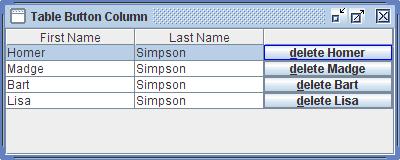
The button can be invoked by using the mouse or the keyboard. Using the Metal or Windows LAF you would use the space bar to invoke the button (I’m not sure about other LAF’s). You can also set a mnemonic to invoke the button. You can set the mnemonic using the setMnemonic() method. In the example above I used KeyEvent.VK_D as the mnemonic.
Notice how the border on the first button is a different color? This indicates that the button has focus and can be invoked by using the keyboard as mentioned above. I decided to use this approach since I couldn’t figure out how to invoke the normal “focus painted” code on a rendered button. You can change the Border using the setFocusBorder() method.
The key to the ButtonColumn class is the usage of an Action to perform the custom processing. When the button is clicked an ActionEvent is created and the actionPerformed() method of the Action is invoked. The table will be the source of the event. Also, the action command will contain the “model” row number of the clicked button. The reason for passing a row number is that multiple rows could be selected so you can’t depend on the table.getSelectedRow() method to return the appropriate row number. The reason for passing the model row is so you can access the TableModel using the same index whether the table uses a RowSorter or not.
Since this class is used as the renderer and editor for the column, the column needs to be editable, otherwise the editor will never be invoked. It is the editor that invokes the custom Action for the column.
The code to create the data as shown in the table could be something like:
String[] columnNames = {"First Name", "Last Name", ""};
Object[][] data =
{
	{"Homer", "Simpson", "delete Homer"},
	{"Madge", "Simpson", "delete Madge"},
	{"Bart",  "Simpson", "delete Bart"},
	{"Lisa",  "Simpson", "delete Lisa"},
};

DefaultTableModel model = new DefaultTableModel(data, columnNames);
JTable table = new JTable( model );
The code to delete a row from a table using the DefaultTableModel would be:
Action delete = new AbstractAction()
{
    public void actionPerformed(ActionEvent e)
    {
        JTable table = (JTable)e.getSource();
        int modelRow = Integer.valueOf( e.getActionCommand() );
        ((DefaultTableModel)table.getModel()).removeRow(modelRow);
    }
};

ButtonColumn buttonColumn = new ButtonColumn(table, delete, 2);
buttonColumn.setMnemonic(KeyEvent.VK_D);
Of course you would probably want to add a confirm dialog before actually deleting the row. Anyway, hopefully you will find the ButtonColumn class easy to use.
Get The Code
ButtonColumn.java
ButtonColumnDemo.java
 Java Tips Weblog
sarcan said
Hi Rob,
always a pleasure reading your blog. There seems to be a glitch with this particular example, though. The actionCommand property generated by ButtonColumn contains the ‘view row’, not the ‘model row’. If you install a RowSorter on your table and change the row order you’ll end up deleting the wrong one, so the line in actionPerformed should probably read
int row = table.convertRowIndexToModel(Integer.valueOf( e.getActionCommand()));
best regards,
sarcan
Rob Camick said
Thanks for pointing that out. I’ve updated the example code.
I also updated the source code. I made some changes earlier this morning which I forgot to upload.
Rob Camick said
After thinking about it for a while I decided to pass the “model” row in the Action event.
Eitan said
Hi Rob,
Like Sarcan said “it is a pleasure”.
If I am not mistaken you do not need
the
public void mouseMoved(MouseEvent e) {}
Rob Camick said
Boy, I was sleeping while doing this one. Thanks, the line has been removed.
Its nice to know people actually take the time to read and understand the code.
André Uhres said
Well done. Just one minor point: you use the terms “TableButton”, “TableColumn” and “ButtonColumn” to refer to the same class, which is a little bit confusing at first reading. I suppose you changed the class name and forgot to update the text.
Rob Camick said
Wow, I was really out to lunch on that, thanks.
Anonymous said
It’s not Madge, it’s Marge ;)
Rob Camick said
Oops, not sure what I was thinking? Hope the Simpsons aren’t too mad with me :)
Peter Hon said
Hi rob,
I am new to java programming and I have read the ButtonColumn.java source code. But I have no idea
on how to use the ButtonColumn.java in my code. Can u suggest any complete example code that shows how
to use ButtonColumn.java. i.e. A Class with main() using the ButtonColumn.java Code. Thanks.
Rob Camick said
This is not a forum. If you don’t know how to create a JTable with data then post questions in a forum. Once you have a table created you create an Action. I posted the code for an example Action to delete a row from the table. I then gave you the 1 line of code needed to convert the text in a column to a button (the second line is optional). So all you have to do is copy/paste the code I gave you in this posting.
Paul Humphrey said
Excellent, Just what I needed
Thanks!
Rob Camick said
Great a comment that wasn’t about a silly mistake I made :) Thanks.
George Moralis said
Using it with JXTable doesn’t seem to work. The event is never fired :(
Rob Camick said
Sorry, the code posted here is designed to work with the base JDK classes. I’m not sure what the problem would be with JXTable.
Michael B. said
Hi, thanks for this neat article + code.
I’m using ButtonColumn right now, however I don’t think I changed the button text right. At line 142, I changed the value inside renderButton.setText() to the text value that I want.
I got the outcome that I wanted but you said the text would be stored in the TableModel.
Sorry for asking such a question and thanks in advance!
Rob Camick said
The text that you want to appear on the button is added to the TableModel the same way you add any other String for any other table column. There is no need for you change the code in the ButtonColumn class.
Michael B. said
Wow quick reply!
Yeah, that was noob of me to do so.
Thanks again sir
Sanya said
Hey Rob,
I tried using your code. I need buttons in the 2nd and 3rd column of my table. I passed 2 as a parameter for column in ButtonColumn. However an action is performed when i click on any column in that particular row. I need an action to be performed only when i click on the 2nd column. Could you help?
Regards,
Sanya
Rob Camick said
Sorry I don’t see the behaviour you describe. I updated this posting with a Webstart demo that shows the behaviour when you add the ButtonColumn to the 2nd column. If you see different behaviour then you can create a simple demo and email the SSCCE using the “Contact Us” page.
Sanya said
Hey Rob,
I tried mailing you by copy pasting the code in the message field. Please let me know in case of any problem. Thanks for your time.
Regards,
Sanya
Anabel said
Hi thnks for you code. It help me a lot.
Right now Im trying to make buttons to open pdf files, Is there a way to create an action for each button? And giving them the path of the pdf?
I hope you can help me thanks!
Rob Camick said
One way is to have a separate column in the table with the PDF path. Then the Action can just get the path from the column. Or if you don’t want a separate column then you can add a custom object to the model. The object would contain the text to display on the button as well as the path of the PDF file. Then you would need to override the toString() method of the Object to return the text. The Action could then access the path.
Anabel said
Thanks for the fast reply.
I dont know what im doing wrong….
(Rest of comment deleted…)
Rob Camick said
I can’t tell from the code you posted what you are doing. Maybe if you email a proper SSCCE through the “Contact Us” page I can take a quick look.
Anonymous said
Nice article sir.
Thanks.
Rob Camick said
Thanks for the feedback.
Umer said
Sir I got a problem here…
The problem is when i put a cell to editable false then this api is not working ….
Rob Camick said
That is not a problem. That is the way an editor works. If you want to be able to click on a button the cell must be editable.
Anonymous said
Nice post & nice comments
Javid said
It was me!
daskhatri said
Dear tell how do i use your code in my program , I developed a JTable that is filling data from database, now I need to add Jbutton in my table with each record… Button is not added yet. How proceed further , Do i have to just access your class in my table program? or first i have to add a JButton in table then access your code?
please give me just five mints
Rob Camick said
Forget about getting data from the database. First you need to understand how to use the class. So create a simple example with 3 columns like I display from the image. Once you get that working then move on to getting data dynamically from a database.
You add data to the TableModel just like you do for any other column of data. Normally the data is just displayed as text. In the image from the blog there are 3 columns of data, firstName, lastName and an untitled column. In all 3 cases you add a String to the TableModel. For the first row you add “Homer”, “Simpson”, “delete Homer”. Then you add a custom renderer and editor to the 3rd column. Again the blog show how to do this and even includes code for a simple Action.
daskhatri said
Thanks Rob.. THank you so much.. :) i did it… now I have to delete it dynamically , so i think i have to use DefaultTableModel..
BR
Das Khatri
Sindh.
Rob Camick said
That is correct you use the DefaultTableModel. I gave example code in the blog.
parvathi said
Hi Rob,
Nice article..It would be great if you could explain why do we need to add mouse listener to the editor button, when we are already adding action listener.
Rob Camick said
I explained that using comments in the code. I didn’t think it was necessary to repeat in the blog since the blog iis for an overview of the functionality, not a detailed look at each line of code.
Protocol-X (@Protocol_X) said
This code is exactly what I have been looking for, but I am having 2 issues. the first issue is the code only works if i remove the override for the following 2 lines. Also no actions are being done when i try to set the action. Any help would be appreciated.
public Component getTableCellEditorComponent(
public Object getCellEditorValue(){
Rob Camick said
If you comment out those lines you defeat the purpose of using the custom editor. The code should work as is if you use the example code I provided in the blog. If you have problems using the example code then create an SSCCE and send me the code using the Contact Us page.
Gerard said
Worked great for me …. except: On Mac OS X the “Aqua” look and feel doesn’t respect JButton colors, so clicking on the Button causes it to go all white. I modified the code in getTableCellRendererComponent as follows as a work around:
if (isSelected) { LookAndFeel lookAndFeel = UIManager.getLookAndFeel(); if (!lookAndFeel.getID().equals("Aqua")) { renderButton.setForeground(table.getSelectionForeground()); renderButton.setBackground(table.getSelectionBackground()); } }Rob Camick said
Thanks for the feedback. It should be helpful for Mac users.
Faisal said
I am new to JAVA. I just wanted to know how to run this piece of code. Does it work as a sub routine in a actionlistener.
Jimmy said
Dear sir
I found your sourse code very helpful.However, i have problems
My table have the 9th colum is button column and 8th column is interger.
How can add header sort in the 8th column, and repaint table, still keep button in the 9th column.
As far as i know, to sort column, table need to extend AbstractTable Model.
I apply:
ButtonColumn buttonColumn = new ButtonColumn(table, myAction, 9). My 9th column goes wrong.
Help me , please
I’m very appreciated
Rob Camick said
The ButtonColumn class is a custom renderer and editor which should not affect sorting so I’m not sure what your problem might be. However, if you have 9 columns then you should should be specifiy “8”, when you create the ButtonColumn class since JTable uses 0 as the offset to reference columns. To add sorting to the table I just use table.setAutoCreateRowSorter( true ) and it works for me.
whoishotter said
Great code – thanks so much for sharing! I’m using it an it works great, so all I could find was a comment typo: Optionally spelled with only one ‘l’ at line 14.
I’m only trying to contribute to your great work by helping edit for you. :) Thanks again!
-Travis
Rob Camick said
Only one typo? I’m getting better :) Thanks.
Emrah İşlek said
Could you send Demo’s source code?
Rob Camick said
The demo code shows mostly how to create a GUI. The blog shows the important couple of lines of code to use this class. You need a couple of lines of code to create an simple Action. Then you need a single line of code to create the class and use this Action. This class can be added to any column that renders text in the column.
Oliver Henning said
Dear Rob,
thanks for your code. The button shows in column and gets focus when clicked, but no event is fired.
public class ScriptTable extends JTable {
...
final Action split = new AbstractAction()
{
	@Override
	public void actionPerformed(ActionEvent e)
	{
		System.out.println("Clicked!"); // not fired
	}
};

buttonColumn = new ButtonColumn(this, split, 3);
Maybe you have an idea what is wrong
Thanks and greetings,
Oliver
Rob Camick said
Is the column editable? I believe it needs to be editable in order for the mouse event to be passed to the editor. Also just try a simple test by just create a normal JTable, instead of extending JTable. Maybe something in your custom table is causing a problem.
Sterling said
Thanks very much for this code. I am using it in an application where I have extended JTable to give me control over column widths. I am also using a unicode down facing triangle (basically I am going to emulate a menu opening from a cell) Your code worked basically dropping it in except that when it was initially rendered the text icon was off center to the right. when clicked it went centered and then when another button was clicked it went offset again. What I ended up doing was simply replacing the line
originalBorder = editButton.getBorder();
in the constructor with
originalBorder = new LineBorder(new Color(122, 138, 153), 1);
and this centered the text. I have no idea why and I am not saying this is a fault of your code just thought you may be interested in that use case.
Gal said
I’ve been working on my school project and needed it. I was gonna try and make such class with examples i found on the internet but now i can use this awesome class. You saved me an hour(probably even more) at class.
Thanks :D
t0th said
Hi,
i have Exception in thread “AWT-EventQueue-0” java.lang.ArrayIndexOutOfBoundsException: 1 >= 0
in line fireEditingStopped();
can you help me?
thanks
Jay said
Awesome Awesome Awesome, thanks a bunch very easy to use. I am happy you did not provide the ‘main’ class. Could not agree more with you, the more you dig/practice/read the more you learn.
resahaw27 said
thank you so much.. this is a very big help in my school project.. more power to you!! :D
Rob Camick said
Good luck with your project.
resa said
i dont know if you can help me but how do i add an actionListener to the button.. i mean what button should i add the actionListener since there 2 jbuttons declared in the code.. i need to open a new jframe when i click the button but i dont know how to do that.. i hope you can help me with that.. thank you so much. :))
Rob Camick said
You don’t add an ActionListener to either of the JButtons defined in the ButtonColumn class. You add the ActionListener to the ButtonColumn class when you create an instance of the class. I gave a simple example. If you want to open a frame then you need to change the code in my example to create and show a frame.
teofil said
first of all, thank you for all your work!
secondly, i want to use this in multiple columns, specifically in the two last columns of the table
but when i run the project only the last column shows the button, the other one nothing!
do you see any reason for this to happen?
well maybe it has to do with the fact that the editor and renderer is in one class!
i am looking at this now and i will post if it makes any difference
Rob Camick said
It works fine for me. You need to create two ButonColumn classes and Actions:
teofil said
sorry about the fuss but you’re right
it works the way i want, i just didn’t made the right adjustments to my code for adding it
btw, i am thinking of using in another column a combobox instead of a button, does this code gives the way it can be done?
a combobox to use for a field that has multiple values
i haven’t searched anything yet, just asking
and again thanks for all your work, very helpful!
Anonymous said
Thanx so much, it’s exactly what I needed!
Jim said
this is a lifesaver! thanx a lot. i would have taken months to figure this out on my own!
Anonymous said
Hi Rob,
Thank you for sharing. I have been trying for some time now to make buttons either invisible or disabled, so that I couldn’t click on a button depending on other variable in the same row.
Could you point me in the right direction of how should I approach this problem?
Thank you,
Borys
Rob Camick said
To prevent a cell from being edited you would override the isCellEditable(…) method of your table model. If you wanted to render the button as disabled, then you would also need to add code in the getTableCellRendererComponent(…) to make the button appear disabled.
Anonymous said
thank you Rob :) this article was very helpful for my project…i want ask a question…how to add an image in the button..
Rob Camick said
Just add an Icon to the TableModel, instead of text.
Isuru said
Hi! Thanks for this class. Just what I was looking for. I have a clarification. To set a text for the button, you have to fill up the renderButton.setText( “” ); in the getTableCellRendererComponent() method, am I right? Or is there any other property or something to accomplish this?
Rob Camick said
A renderer gets the data from the TableModel.
Isuru said
Wait! I think I got it. I added “Reserve” to the end of model.addRow(new Object[] {rs.getString(“title”), rs.getString(“author”), rs.getString(“isbn”), rs.getString(“publisher”), “Reserve”}); and everything’s good now. I must have somehow missed the line ‘You store text (or an Icon) in the TableModel’ in the article. Thanks.
tauruzian said
How do I do if I want to delete just Homer instead the entire row.
Rob Camick said
Use the setValueAt(…) method.
Katerina said
Hi, excellent post like every others…but the method buttonColumn.setMnemonic(KeyEvent.VK_D); it didn´t work on my code, I try to change it to buttonColumn.setMnemonic(KeyEvent.VK_DELETE), to use the delete key , but when press it , nothing happens. Plz can u tell me what I´m doing wrong.?? Thx
Rob Camick said
Focus must be on the cell. And you use Alt+D to invoke the Action.
Katerina said
Thx, the problem was I forgott to press Alt key first.
There is anyway to invoke the Action just pressing delete key ?
Rob Camick said
Swing uses Key Bindings to invoke Actions with a KeyStroke. Search the blog for my Key Bindings entry and don’t forget to read the Swing tutorial on Key Bindings for a better understanding of how Key Bindings work.
With regards to this class you can use the following code. Now pressing the key or Alt+key should invoke the Action.
public void setMnemonic(int mnemonic)
{
	this.mnemonic = mnemonic;
	renderButton.setMnemonic(mnemonic);
	editButton.setMnemonic(mnemonic);

	Action mnemonicAction = new AbstractAction()
	{
		public void actionPerformed(ActionEvent e)
		{
			ButtonColumn.this.actionPerformed(e);
		}
	};

	String key = "mnemonicAction";
	KeyStroke keyStroke = KeyStroke.getKeyStroke(mnemonic, 0);
	editButton.getInputMap().put(keyStroke, key);
	editButton.getActionMap().put(key, mnemonicAction);
}
Katerina said
Hi Rob, I have another problem when the focus is on the cell doesn´t change the shape it looks like. Did u understand me? The point is that I need the usser can note the difference between when have focus and when is not. Thanks for advance.
Rob Camick said
The Border changes when the cell has focus.
Muhammad Bilal said
I am using ButtonColumn class to create a delete button in my JTable
DefaultTableModel dtm = new DefaultTableModel()
{
	public boolean isCellEditable(int row, int column) {
			return true;
	}
};
JTable jTable1 = new JTable(dtm);

dtm.addColumn("Type");
dtm.addColumn("Amount");
dtm.addColumn("Details");
dtm.addColumn("Status");
dtm.addColumn("Operation,Delete");

JScrollPane jScrollPane1 = new JScrollPane(jTable1);
frame.getContentPane().add(jScrollPane1);
frame.setResizable(false);

Action delete = new AbstractAction()
{
	public void actionPerformed(ActionEvent e)
	{
		JTable table = (JTable)e.getSource();
		int modelRow = Integer.valueOf( e.getActionCommand() );
		((DefaultTableModel)table.getModel()).removeRow(modelRow);
	}
};

ButtonColumn buttonColumn = new ButtonColumn(jTable1, delete, 3);
buttonColumn.setMnemonic(KeyEvent.VK_DELETE);
This is the code for jtable but there is no text show on button.I don’t know how to show the text using model.Can you please help me out
Rob Camick said
You didn’t add any data to the model. You add the text you want displayed on the button to the model the same way you add text for any other column. By the way you are adding the ButtonColumn using index 3, which is your ”’Status” column. I would guess you want that to be index 4.
Muhammad Bilal said
Thanks i got the point it is getting the values from model.Problem solved.Thanks for you help.
Engr Asya said
Hi…
this Code works for me.. but i need some help.. i want to add button in jtable cell. i have used DefaultTableModel.
Button Should display Link word, but when user click on it the save URL must be open in default Browser.. i have done so far retrived Link from databases but button making me confuse.. plz help
Rob Camick said
I can’t help you write you Action. The Action is basically the same as writing an ActionListener and adding the listener to a JButton that is not displayed on the table. The main difference is that using this class you have direct access to the “row” where the button was clicked. When using a button outside the table you need to get the selected row of the table.
bt said
It is a very handy class that I find is extremely useful. I notice that both the ActionListener and MouseListener are implmented. The MouseListener is necessary to control the “editing” status at the right moment, but is the ActionListener a must? It seems that just construct the new ActionEvent in the MouseReleased() can do the same. Am I missing something?
Rob Camick said
The ActionEvent is the important event to make sure the Action you supply is executed. The button can be invoked by the mnemonic (if one is set) or by using the space bar when the cell has focus or by clicking on the cell with the mouse. The MouseListener is just used to make sure the button is painted in a proper state. If the user click on one row and then releases the mouse over a different row (or column) you don’t want to execute the Action. A mouse click is defined by a pressed/released on the same cell.
Chaitanya Dalvi said
Thanks.. Its Very useful post..
Please, can u help me?
I hv Jtable with (ProductID, ProductName,Image) column
I want button on ProductID column with text “Add”.
When user click on button text change to “Remove” and row highligh with color.
Actually i dont want to remove data from model, i just want show to product is added to cart..
Please help…
Rob Camick said
So you need to write a custom Action. I can’t help you with the Action because I don’t know how to show “a product is added to the cart”. If you want the text to change from “Add” to “Remove” then your custom Action will need to update the text in the TableModel. In addition your Action will need to check the current text in the model to determine what Action to perform. I suggest you start with a simple Action that just changes the text every time the button is clicked. Once you get that working then you implement the “add” and “remove” logic.
olaxoamor said
Thank you so much for this code! It is so useful. This may be a stupid question but where in ButtonColumn would I change the button default settings (size, color, etc)
Rob Camick said
The size of the button will be the size of the cell. This is the way all renderers/editors work. You can change other properties of the button in the constructor when the buttons are created.
Matthew said
I was looking to change the size of the button itself. So instead of it taking up the full cell it would only take a percentage. With a true button I could do something like
renderButton.SetPreferredSize(new Dimensions(width, height))
but when I try to do that here, it get’s ignored (or I’m doing it wrong, ha ha).
Rob Camick said
What you can do is use a “wrapper panel”. In the constructor you create two panels one to hold the render button and one to hold the edit button. Then instead of returning the button from the “get…” methods you return the respective panel. Now the panel will be sized to fit the cell and the button will be displayed on the panel based on the layout manager you use for the panel. So in this case if you set the preferred size it will be respected.
For example in the constructor you would do something like:
Matthew said
Arg, of course! I kept trying to make the wrapper panel in the wrong spot! I put them in the right spot and it works like a champ, thank you so much!
John said
Great post! It helped me a lot. But I have one question: why do you use an Action instead of an ActionListener. Using an ActionListener would make it easier because you only had to define the actionPerformed ().
Rob Camick said
Actions are more powerful than ActionListeners and can be used anywhere an ActionListener is used even if you don’t use all the Action features. It is also easy to implement, you just extend AbstractAction and override the actionPerformed() method (as my example Action from the blog does).
Paul Adcock said
Ok, what does the Action do to the row involved? I thought columns were vertical.
Rob Camick said
Yes, columns are vertical, but the Action can do whatever you want. Generally it would do something with the entire row. I gave an example of how you can add an Action to delete the row.
Paul Adcock said
I tried the following and it is having two columns of buttons. How do I get rid of the duplicate button column?
import javax.swing.JTable; import javax.swing.JFrame; import javax.swing.table.TableColumn; public class TableTester2 { public static void main(String[] args) { JFrame jf = new JFrame("Test 2"); jf.setVisible(true); Object[][] values = new Object[2][2]; for (int i = 0; i < values.length; i++) { for (int j =0; j < values[i].length; j++) { values[i][j] = "Data"; } } Object[] headers = new Object[2]; headers[0] = "Bob"; headers[1] = "Mike"; JTable jt = new JTable(values, headers); TableColumn tc = new TableColumn(); jt.addColumn(tc); ButtonColumn bc = new ButtonColumn(jt, new javax.swing.AbstractAction() { public void actionPerformed(java.awt.event.ActionEvent e) { System.out.println("Woo"); } }, 0); bc.getEditButton().setText("Edit"); bc.getRenderButton().setText("Render"); tc.setCellRenderer(bc); tc.setCellEditor(bc); jf.add(jt); jf.setDefaultCloseOperation(JFrame.EXIT_ON_CLOSE); } }Rob Camick said
When you create a TableColumn you need to specify which column from the TableModel the data come from. By default it assumes column 0, which is the column you added the ButtonColumn to. You can’t just create TableColumns, you also need data in the TableModel. So when you create your model you need to specify 3 column headers and 3 columns of data for every row. Then you add the ButtonColumn to the last column.
Paul Adcock said
How do you set the text of the JButton? I tried accessing the render and edit buttons and setting the text, but nothing is changing.
Rob Camick said
What does my blog write up say? You should never play with the renderer or editor, they just display whatever is in the TableModel.
Paul Adcock said
You have an example at the top that has text on them.
Also, I removed the part that was messing with the render and edit button text.
However, for some odd reason, now any JButton I add, even outside the JTable, doesn’t have text either. I’ve passed it a String as a param and also called the setText() and neither seems to work.
Rob Camick said
Yes, that is the way JTable works. The blog states you can add text (or an Icon) to the model. Then the model value is rendered as a button. You DON”T add a JButton to the model, if that is what you are trying to do.
Paul Adcock said
I posted some comments here but can’t seem to find them. Is there another page here somewhere? I had asked how to make it so that there is a button on all but the top row. It’s a formula table of a sort and the top row only holds a grand total. It should never be removed.
Rob Camick said
You can override the getCellRenderer(…) and getCellEditor() methods of JTable to return a different renderer/editor. This is a general question about how table work and should be posted in a forum. It has nothing special to do with this class.
Paul Adcock said
It is about the class. I do want the buttons there but as the top row contains the top row, I never want it to be able to be removed. I should be able to, knowing the row and column, be able to use the ActionListener in your class to ensure that it won’t remove if a button is clicked in the event that the button is in the top row.
I am thinking that if I call setCellRenderer() and setCellEditor() that in there, if I give it a new CellEditor/Renderer, that I can override the getTableCellRenderer/EditorComponent method and can use the row and col values passed to it to return null in the case of that row where I don’t want it removed, but where might a NullPointerException be thrown if I did that? Also, now that I think of it, how do I keep what yours is doing for the other rows if I call these set methods? I’d need to override yours and call super and then just add an addition.
Rob Camick said
It has nothing to do with this class. I would override the getCellRenderer method to return the renderer for Object.class, so it renders as a String. Then I would add an empty string to the model so there is nothing to renderer. Then I would also override the isCellEditable() method to return false for the top row (or whatever your exact requirement is).
Paul Adcock said
I was wondering, why would an additional button outside of the Table not show its text?
Also, how do you disable one of the buttons, just one? There is something I want to use for that row that can’t allow it to be removed.
Paul Adcock said
How do you make sure that you have the buttons but that you can’t remove one of the rows (i.e. the top row)? (Preferably by not having the button in that row).
Sultan said
Tried this solution on your other class where you fill table with database, the one called “ListTableModel” and it doesn’t work, the buttons appear but they are not clickable. do you know why this is happening, maybe a workaround?
Rob Camick said
By default when you use the createModelFromResultSet() method the model is not editable. So you probably need to invoke the setColumnEditable(…) method on the column where you display the button to enable the editor.
Sultan said
thanks Rob, that worked!
Anonymous said
What is this ..? this is not working..
bc.getEditButton().setText(“Edit”);
bc.getRenderButton().setText(“Render);
Rob Camick said
Read the Swing tutorial on Concepts – Renderers and Editors that I provided above. It explains how renderers/editors work. All cells share the same renderer/editor, so you can’t just hard code the values. The values come from the model.
karan said
hi,
am a new to swings ….i dint understand what that button class is doing, i want to retrieve data from database along with edit and delete button in the jtable………all i could do was to add data but not button any help?????
thanks…
Rob Camick said
I added example code that show how you add data to the TableModel so that the second column can be rendered as a button.
JennyJintao said
Hi, thanks for sharing your code. However, I wonder whether it is possible to add a button to a specific cell of a table, for example row=0, column=1, instead of adding a button to each row of the same column of the table?
Rob Camick said
The TableButtonColumn class installs itself as the renderer for the entire column. You can override the getCellRenderer(…) and getCellEditor(…) methods. They both receive the row/column as a parameter, so if the row/column is the value you want you would invoke return super.getCellRenderer(…) and super.getCellEditor(…). Otherwise you would probably return the classes from the JTable.getDefaultRenderer(…) and JTable.getDefaultEditor(…) methods.
JennyJintao said
Thank you~ I’ll try to figure it out ^_^
Anonymous said
Nice work!!!
kumar said
How to set a mnemonic to invoke the button please share with code
Rob Camick said
Read the blog. The example code already shows you how to do this.
cps said
Thank you for sharing.. it works great :)
I used the decorator in a JXTreeTable, that (after making the column with button editable) worked ouf of the box.
I only have one issue – the action event is triggered before the selection path in the tabletree has changed.
In the tree, I have an amount that is increased by one when the button is pressed:
one row contains “[amount] [name] [button-increase]”
My action code recovers the actual node from the tree like
So if row A is selected, and i press the button in row B, the selection path returns the node from row A.
I could “fix” this by wrapping the action invocation in:
final int row = table.con....[...]
        [....]
        // Invoke the Action
SwingUtilities.invokeLater(new Runnable() {

	@Override
	public void run() {
		ActionEvent event = new ActionEvent(table, ActionEvent.ACTION_PERFORMED, "" + row);
		action.actionPerformed(event);
	}
});
now the selectionpath is updated before the action is delegated.
Rob Camick said
That is the fix I would use. It is a common solution to use the SwingUtilities.invokeLater(…) to add code to the end of the EDT to make sure the JDK event code is finished executing.
syncope said
Hi, thanks a bunch for sharing your work, it still helps people across the world even after years :)
David G said
wonderful example.
really helped me.
I’m trying to create a table consisting of buttons only,
each button , when pressed, should launch a new jframe with the col and row data of the cell that was pressed,
I now use your class with a for loop to implement on the entire table, but its not perfect,
your class is built to handle a column (ex. the action even returns only columns etc.)
any tips for me for modifying it for an entire table ?
thank you very much,
Dave
Rob Camick said
You can make this class the default renderer/editor for all columns in the table by doing something like:
Then in your custom Action you would need to get the column by using the table.getSelectedColumn() method.
Anonymous said
Greeeat API! Help me a lot. I just had a problem, but seeing the comments, I figured out. My all jtable was not-editable, then, the button didn’t work. But i just put that column like editable and ALL done =]. It’s beautiful! Fantastic!
jaganmohanchandrasekaran said
Thank you so much Rob! Amazing API!
Jagan said
is it possible to set the foreground and background color of the button?
Rob Camick said
Its just a regular button so if the LAF allows that then you should be able to do it. Add the code when the button is created.
Jagan said
Thanks Rob for the reply! But, i am new to this area, honestly i don’t get a clear understanding of what you have said! Can you please provide me some sample code on how to implement this? Is it possible? Appreciate your help! Thank you!
Rob Camick said
How do you change the property of any Swing object? You invoke a “setter” method on the object. If you want to change the background then you modify the code found in the TableButtonColumn class with something like:
Jagan said
Thank you Rob!
Pranav said
I tried doing this, but only the buttoncolumn2 gets associated to the action, none else. Could you please help me with it??
Also I tried removing buttonColumn2 & 3, then also buttoncolumn1 dint worked out !
Rob Camick said
Using the example table in this posting I also added the DeleteAction to column 0 and it worked fine. Try the same to prove it works and then see what is different in your table and your Action. Add a System.out.println(..) to your Action to see if it is invoked. If you still have problems then create a proper SSCCE and use the “Contact Us” page to email me the SSCCE.
Rob Camick said
From your SSCCE:
boolean[] canEdit = new boolean [] { false, false, false, false, false, true, false };The column must be editable in order to invoke the Action.
Anonymous said
Oh okay! Thanks a lot. It worked. :)
Anonymous said
Can I add button to only one cell in table rather than whole column using your code or maybe through a few changes?
Anonymous said
Good Question?
Rob Camick said
JTable is designed to display a renderer or editor for an entire column. This is a general question about tables and not a question related to the code posted here. Your question should be posted in a general forum.
Anonymous said
This class is still contributing and Works Great! Thanks a bunch. :)
Misha said
Excellent tutorial. I couldn’t get the button to fire when pressed and finally realized that it was because the column wasn’t editable in the Model class. Had to override the method like so:
@Override
public boolean isCellEditable(int rowIndex, int columnIndex) {
return true;
}
Cameron Gray said
Thanks, this looks is extremely helpful!
Rob – What licence is this code released under? Public domain?
Anonymous said
just what I was looking for, thanks :)
Manish said
I used this example to in my jtable and created three button columns (two to add and remove rows). I want to bind the table data to a XML java bean. In my app, I’m using similar XML binding for text field). Using this example.
http://www.java2s.com/Code/Java/Swing-Components/JGoodiesBindingAbstractTableModelExample.htm
But I cannot do this? Any pointers please?
Rob Camick said
I know nothing about JGoodies classes. The TableButtonColumn is a renderer/editor. If JGoodies works on a TableModel, then this class should have no effect. First get the JGoodies code working with the default renderers/editors.
Manish said
Thanks for a quick response. I also need to do java xml binding with my rows similar to this example –
https://stackoverflow.com/questions/25963403/how-to-make-xml-schema-relatelink-to-jtable-xml-java/44423776#44423776
Haritha said
Hi, This code works for me. But I am experiencing this weird behavior.
For e.g first time I load the table with 5 data. Second time it’s loading with 2 data. When I click on empty spaces it’s starting to load previous data. I am creating new model when I fetch new data. What could be wrong? Any possible pointers?
Rob Camick said
The ButtonColumn acts as a renderer/editor for the table. It has nothing to do with the number of rows of data that are displayed in the table.
However, when you create a new TableModel the JTable will recreate the TableColumnModel and any custom renderers/editors will be reset back to the default. A couple of options:
1. add the ButtonColumn back to the table after the data has been loaded
2. after creating/loading data the first time you can use the JTable.setAutoCreateColumnsFromModel( false ).